How to Make a Vision Board on Your Phone, Step by Step (With Your Own Photos)
A vision board is a collage of images and words that represent what you want to grow in your life: a project, more calm, a trip, a healthier relationship. It used to take magazines, scissors and a poster board. Today you can make one on your phone in twenty minutes, with your own photos, and carry it with you everywhere.
Let's be honest about one thing: there's no evidence that looking at a picture makes things "show up" on their own. What a good vision board does is remind you every day what matters to you, so your small decisions start moving in that direction. That's how we'll use it here.
Before you start: paper or digital?
A paper vision board has something special: you make it with your hands and hang it in your room. A digital one has a different advantage: you see it far more often, because you look at your phone dozens of times a day. If consistency is hard for you, digital usually works better. And nothing stops you from having both.
Step 1: pick 3 to 5 areas of your life
A board with twenty wishes turns into noise. Keep only what you truly want to work on in the next few months. Some ideas:
- Career and purpose: a project, a promotion, learning something new.
- Calm and rest: sleeping better, having more time for yourself.
- Mindful money: saving for something specific, paying off a debt.
- Relationships: more time with your people, setting healthy boundaries.
- Self-love and health: moving more, talking to yourself more kindly.
- Creativity: getting back to something you used to love doing.
Step 2: choose one photo per area
Look through your camera roll before searching online. A photo of you on the beach says more about "I want to rest" than any stock image, because it reminds you how that feels. If you don't have one, a picture of a place or a scene that inspires you works too. Look for images with some empty space (sky, a wall, water) where a phrase can fit.
Step 3: write a specific phrase for each photo
This is the difference between a pretty board and a useful one. Compare:
- Instead of "be a millionaire," try "I save a little every month for my trip."
- Instead of "success," try "This year I finish the project I have in mind."
- Instead of "peace," try "I give myself rest without guilt."
Short, present-tense phrases that describe a step you can take work better than huge promises. If a phrase sounds fake when you read it, tone it down until you believe it.
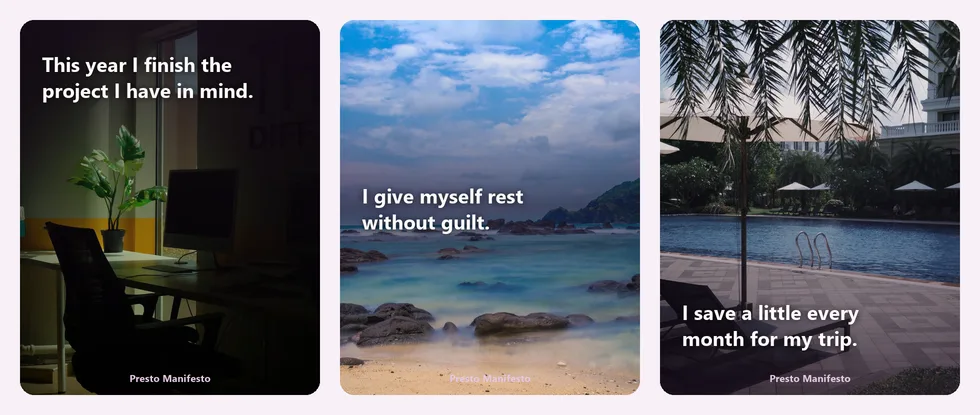
Step 4: put photo and phrase together in one image
You can do this with any design app. If you want something quicker, here's how it works in Presto Manifesto:
- On the Today screen, tap the gold button "Create your own custom manifesto."
- Choose a photo from your gallery. You can rotate, flip and crop it to keep only the part you want to show.
- Write your phrase. The app leaves an example in case you don't know where to start; delete it and write your own.
- Choose where the text goes: Top, Center or Bottom. On a collage or a busy photo, the center usually reads best.
- Tap "Create your own custom manifesto" and share it or save it.
Your photo never leaves your phone: it's only used when you share it. Repeat for each area and you'll have your full board.
Step 5: keep it where you see it every day
- Wallpaper: the image for your most important area, so you see it every time you unlock your phone.
- Its own album: keep all your images together and look through them for a minute each morning.
- Stories: sharing a phrase with your friends also makes you a little more committed.
How to use it without turning it into pressure
Look at it with curiosity, not as a list of demands. A good habit is to ask yourself, when you see it: what small step can I take toward this today? Sometimes the answer is big, and sometimes it's just drinking water or sending a message. Both count. If a goal no longer feels like you in a few months, change it: your board should grow with you. To back it up with daily phrases, try these 50 morning affirmations to start your day.
Presto Manifesto gives you one affirmation a day on a photo that matches your mood, and lets you create your own manifesto with your photos and your words.
Get it on Google Play
Frequently asked questions
How many images should a vision board have? Three to five is a good start. Fewer, clearer images are easier to remember than a crowded collage.
Is a paper or a digital vision board better? Neither is better on its own. A paper one is fun to make; a digital one gets seen many more times a day. Choose the one you'll actually look at.
How often should I update it? Review it every three months or whenever something important changes in your life. Changing it isn't failing; it's adjusting course.
Will a vision board make my wishes come true? Not by itself. It helps you get clear on what you want and remember it every day; results come from the steps you take. If you're going through a hard time, it's also worth reaching out for professional support.
If you liked this guide, keep going with 30 self-love affirmations for women and a 7-day plan.
For general information and well-being only. Not a substitute for care from a health professional or for financial advice.