How to take a selfie to try on hair color (so it looks real)
You try blonde on your photo and it looks like a wig. You try copper and it spills onto the wall. Before you blame the app or rule out the color, look at the photo: in our tests with real selfies, the photo matters more than the color. The same person can look amazing or unrecognizable depending on light, pose and framing.
These are the rules we learned testing LookAI with all kinds of photos, and how to fix the most common mistakes in a minute.
Why the photo matters so much
A hair color try-on app doesn't paint new hair: it recolors the hair already in your photo, keeping its highlights, shadows and strands. With good light there's plenty of detail to keep and the color looks real. If the photo is dark, blurry or shows little hair, there's no texture to work with and the result looks flat or painted on.
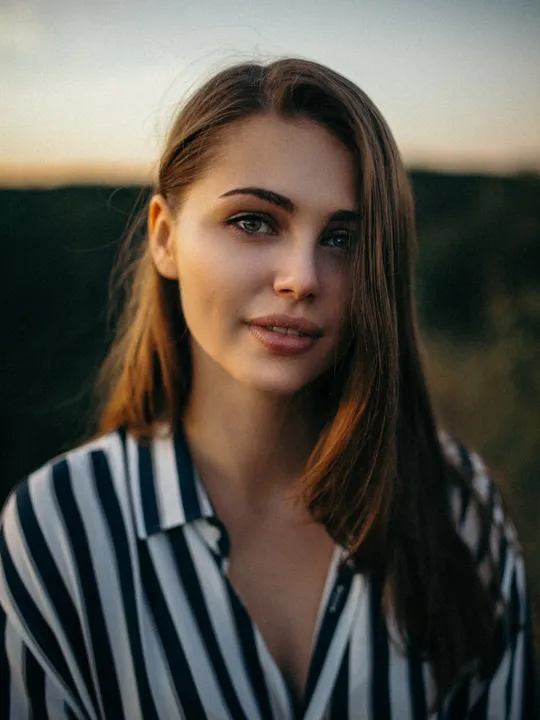
7 rules for a good hair color selfie
- Daylight, in front of you. Face a window during the day. Natural light shows your hair's shine and strands. Avoid night shots and yellow bulbs.
- No backlight. If the window is behind you, your face and hair go dark. Light should hit you from the front or slightly to the side.
- Face the camera. In profile or turned far away, the app sees less hair and your face at an odd angle. Straight on or slightly turned is ideal.
- Hair down and in view. Let it show on both sides of your face and, if it's long, over your shoulders. No buns, caps, hoods or scarves.
- Keep hands and objects off your hair. The classic hand-on-head pose covers exactly the top. Lower your arms.
- Show your whole head. Leave some room above; if the photo cuts off the crown, the color gets cut off too.
- No filters. Beauty filters change your skin and hair tones. Use the regular camera.
Bonus: a background that doesn't blend with your hair
If your hair is dark, avoid a black background or a dark couch right behind your head: the app may mistake it for hair. A light wall is perfect.
Common mistakes and how to fix them
- "The blonde looks like a wig." Usually a night photo or very dark hair. Retake the selfie in daylight. If your hair is nearly black, also try browns, mahogany or copper, which look more natural.
- "The color spills onto the wall or my clothes." It happens with backgrounds or clothes the same shade as your hair. Change the background or your top.
- "Part of my hair doesn't change." Usually a spot in deep shadow or covered by a hand. More light and uncovered hair fix it.
- "Only one strand changes." The photo shows very little hair: you're too close or turned away. Step back a little and face the camera.
- "I used an Instagram screenshot." Screenshots are low quality, with filters and buttons on top. Use the original photo or a new selfie.
How LookAI helps with the photo
When you take your photo, LookAI reminds you of three tips: face the camera, good light and visible hair. And if the photo you chose is very dark, your face isn't clearly visible or your hair is covered, it tells you before showing the result, with an example of a good selfie and a button to take another. You can still see the result, but you'll know why it might not look real.
Once your selfie is ready, continue with how to try on hair color on your photo before you dye it and what hair color suits your skin tone.
LookAI recolors your hair while keeping its shine and strands, and shows before and after side by side. It's free and your photo never leaves your phone.
Get it on Google Play
Frequently asked questions
Why does the hair color look fake on my photo? It's almost always the photo: low light, a face turned to the side, hair covered by hands or a cap, or beauty filters. A front-facing selfie in daylight with your hair down makes a big difference.
Can I use a screenshot from Instagram or WhatsApp? It works worse: screenshots are low resolution, have bars and buttons on top and often filters. Use the original photo from your gallery or take a new selfie.
Can I use a photo taken at night? You can, but dark hair shows almost no strand detail in low light, so the new color looks flat. A daytime photo facing a window gives a much more realistic result.
Is my selfie uploaded when I try colors in LookAI? No. LookAI runs its AI on your phone and your photo is never sent to a server.
LookAI shows an approximate preview. The real result depends on your hair and your stylist.