How to try on hair color on your photo before you dye it
A new hair color is exciting, and a little scary. Would blonde suit me? Will copper wash me out? What if I hate it? Dye doesn't come with an undo button: fixing a color can take several salon visits and a toll on your hair.
That's why more people try the color on a photo first. This guide shows you how to do it well: which photo to use, what to look for in the result, what an app can't tell you, and how to bring your test to your stylist.
Why test a color before the salon
- You see the color on your own face, not on the model on the box. The same blonde can light up one face and flatten another.
- You compare several options in minutes. Trying ten colors on a photo costs nothing; trying two on your actual hair doesn't.
- You walk into the salon with a clear picture. Showing your stylist a photo of you in the color you want avoids "I asked for light brown, not dark blonde."
Step 1: pick the right photo
We cover it in detail, with examples, in how to take a selfie to try on hair color; here are the essentials.
The test is only as good as the photo. To help the app find your hair and make the color look real, use a photo that is:
- Front-facing or slightly angled, with your face and hair in view.
- In natural light, near a window. Warm indoor bulbs and backlight shift how colors look.
- Hair down, no hat, scarf or hood.
- Filter-free. Beauty filters already change your skin and hair tones.
- Against a background that contrasts with your hair. A light wall beats a couch the same color as your hair.
Step 2: try a range, not just your dream shade
The color you love on someone else isn't always the one that suits you best. Try your favorite, then a shade lighter, a shade darker, and one from a different family:
- Blondes: platinum, honey, rose gold.
- Browns: chocolate, caramel balayage.
- Dark: jet black, midnight blue.
- Warm and red: mahogany, copper red.
- Fashion colors: pastel pink, lavender, ash.
Sometimes the winner is a color you never would have considered. Not sure where to start? See what hair color suits your skin tone.
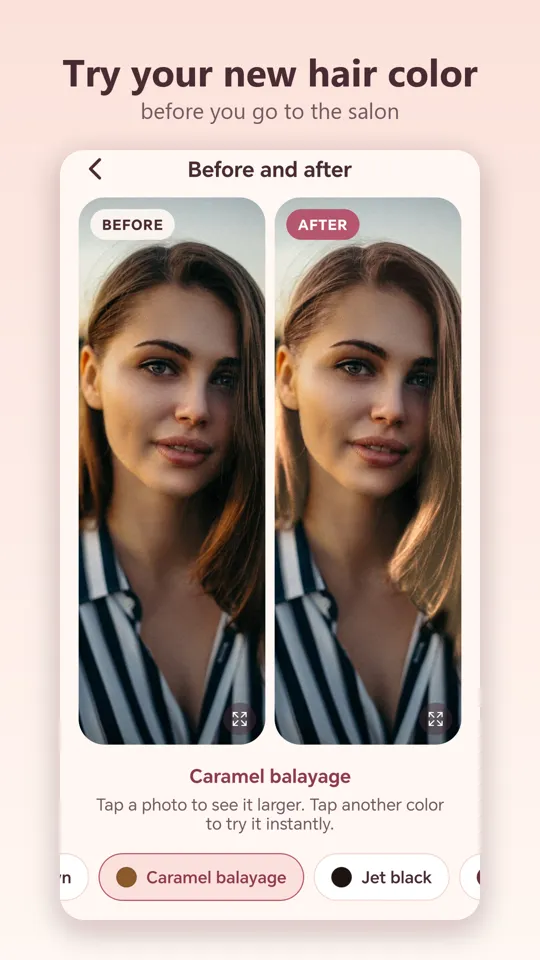
Step 3: what to look for in the result
Go beyond "I like it" or "I don't." Check:
- Your skin. Does it look brighter or duller? Do dark circles or redness stand out more? A good color makes your skin look rested.
- Your eyes and brows. A color far from your brow color can look off. If you still love it, mention it to your stylist.
- Contrast. People with high natural contrast (fair skin and dark hair, for example) often carry bold colors well; with low contrast, softer shades tend to flatter.
- The full-screen view. Look at the result up close, then from a distance, the way someone across the table would see you.
A tip: save your top two or three and look at them again the next day. The one you still like with fresh eyes is usually the right call.
What an app can't tell you
A photo test is a great help, but it's an approximate preview. Some things only show up on your real hair:
- Whether you need bleach. Going from dark brown to platinum usually means lightening, sometimes over several sessions.
- How your hair takes color. Previously dyed, gray or very porous hair absorbs color differently.
- Upkeep. Reds and fashion colors fade fast; blondes need toning; roots show more the further you go from your natural color.
- The real price at your salon.
Use the test to choose a direction, and settle the details with your stylist.
Step 4: bring the test to your stylist
- Save or screenshot your photo with the chosen color.
- Show it next to your original photo, so they can see your starting point.
- Ask whether it can be done in one session, whether you'll need bleach and how much upkeep it takes.
- If they suggest a similar shade, try that one in the app too before you decide.
How to do it with LookAI
- Open LookAI and take a selfie or pick a photo from your gallery.
- Choose a color from the catalog: 12 shades, from platinum blonde to midnight blue.
- See before and after side by side. Tap a photo to view it full screen.
- Tap another color to try it instantly, without retaking the photo.
LookAI keeps your highlights, shadows and the texture of every strand, so the result looks natural rather than painted on. And the AI runs on your phone: your selfie is never uploaded to a server.
LookAI is free, needs no account and works in English and Spanish. Try as many colors as you like.
Get it on Google Play
Frequently asked questions
Can I see how a hair color looks on me before dyeing? Yes. A hair color try-on app like LookAI finds your hair in a selfie and applies the shade you pick, so you can compare before and after side by side before you book the salon.
Will the salon result match the app? Not exactly. It is an approximate preview: the real result depends on your starting color, the condition of your hair, whether you need bleach and your stylist's work.
What photo works best for a hair color try-on? A front-facing selfie in natural light, with your hair down and visible, no beauty filters and no hat.
Is it safe to use my selfie in a hair color app? It depends on the app. LookAI runs its AI on your phone and never uploads your photo to a server. With other apps, check the privacy policy.
LookAI shows an approximate preview. Before dyeing, talk to a professional, especially if you have a sensitive scalp or hair dye allergies.